> ## Documentation Index
> Fetch the complete documentation index at: https://platform.eldros.ai/docs/llms.txt
> Use this file to discover all available pages before exploring further.
# Configuration
> The API key, every setting, and exactly what init() does at startup.
## The API key
Everything starts with an Eldros API key (format `agt_...`). Generate it from the Eldros platform dashboard: open your agent, go to **Configuration**, and under **Trace API Keys** give the key an optional label (e.g. `production`) and click **Generate new key**.
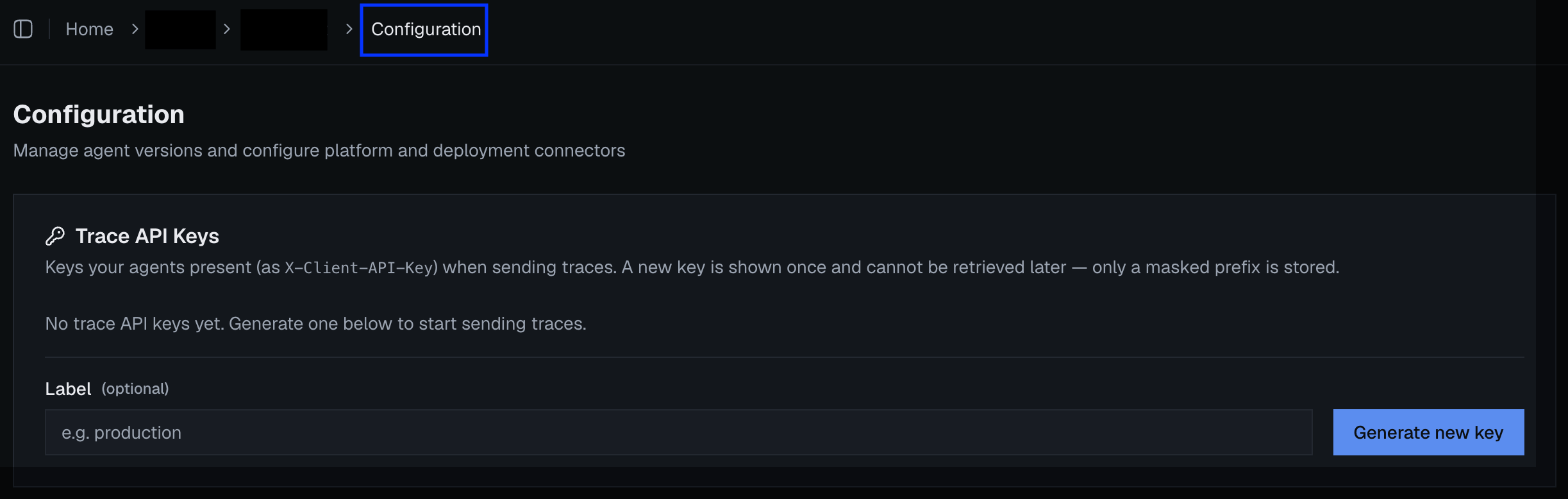 A new key is **shown once and cannot be retrieved later** — only a masked prefix is stored. Copy it into your secret manager immediately. And treat it like any credential: environment variable or secret store, never committed to source control.
Set it as an environment variable:
```bash theme={null}
export ELDROS_API_KEY=agt_...
```
`init()` uses the key to resolve your trace configuration from the Eldros platform at startup — you never configure endpoints, headers, or backends yourself, and rotating infrastructure on our side never requires a client change.
### One key per agent
Generate a **separate key for every agent you onboard** — the key *is* the agent's identity. That's what keeps each agent's traces and conversations isolated from one another, and it's how Eldros knows which agent a simulation run or a judged conversation belongs to. Sharing one key across agents merges their telemetry into a single stream that can't be cleanly separated afterwards.
## All settings
Explicit `init()` kwargs always win over environment variables; environment variables win over defaults.
| `init()` kwarg | Environment variable | Default | What it does |
| ----------------------------- | ------------------------------------ | -------------------- | --------------------------------------------------------------------------------------------------- |
| `api_key` | `ELDROS_API_KEY` | — | your Eldros key (`agt_...`) |
| `api_base_url` | `ELDROS_API_BASE_URL` | Eldros cloud | only set if directed (dedicated deployments) |
| `traffic_type` | `ELDROS_TRAFFIC_TYPE` | `"prod"` | `"prod"` for live traffic, `"eval"` for internal testing — keeps test noise out of production views |
| `instrument_openai` | `ELDROS_INSTRUMENT_OPENAI` | extra installed → on | force LLM auto-instrumentation on/off ([details](/docs/tracing)) |
| `instrument_anthropic` | `ELDROS_INSTRUMENT_ANTHROPIC` | extra installed → on | same, for Anthropic |
| `instrument_claude_agent_sdk` | `ELDROS_INSTRUMENT_CLAUDE_AGENT_SDK` | extra installed → on | same, for the Claude Agent SDK |
| `capture_content` | `ELDROS_CAPTURE_CONTENT` | `true` | record prompt/response text on LLM spans ([privacy](/docs/tracing#content--privacy)) |
| `debug` | `ELDROS_TRACE_DEBUG` | `false` | also print spans to the console |
| `enabled` | `ELDROS_TRACE_ENABLED` | `true` | master switch — `false` makes the whole SDK a no-op |
Boolean environment variables accept `1/true/yes/on` (anything else is false).
## What init() does at startup
```python theme={null}
eldros_sdk.init(traffic_type="prod")
```
1. Resolves settings (kwargs → env vars → defaults).
2. Makes **one brief blocking call** to the Eldros platform to fetch your trace configuration — call `init()` at import time or in your startup hook, **before your event loop starts**, not inside it.
3. Wires up OpenTelemetry and auto-instruments the LLM libraries whose [extras are installed](/docs/tracing).
Call it once per process; repeat calls are ignored with a warning.
## Failure behavior — designed to never take you down
* **No API key / resolution fails:** the SDK logs a warning and degrades — spans are still created but not exported. Your agent runs exactly as before.
* **`enabled=False`** (or `ELDROS_TRACE_ENABLED=false`): everything becomes a hard no-op — the documented kill switch for incidents or environments where telemetry must be off.
* **Not initialized at all:** every SDK call (`turn()`, instrumentation) is a safe no-op. It is safe to leave Eldros code in paths that sometimes run without `init()`.
A new key is **shown once and cannot be retrieved later** — only a masked prefix is stored. Copy it into your secret manager immediately. And treat it like any credential: environment variable or secret store, never committed to source control.
Set it as an environment variable:
```bash theme={null}
export ELDROS_API_KEY=agt_...
```
`init()` uses the key to resolve your trace configuration from the Eldros platform at startup — you never configure endpoints, headers, or backends yourself, and rotating infrastructure on our side never requires a client change.
### One key per agent
Generate a **separate key for every agent you onboard** — the key *is* the agent's identity. That's what keeps each agent's traces and conversations isolated from one another, and it's how Eldros knows which agent a simulation run or a judged conversation belongs to. Sharing one key across agents merges their telemetry into a single stream that can't be cleanly separated afterwards.
## All settings
Explicit `init()` kwargs always win over environment variables; environment variables win over defaults.
| `init()` kwarg | Environment variable | Default | What it does |
| ----------------------------- | ------------------------------------ | -------------------- | --------------------------------------------------------------------------------------------------- |
| `api_key` | `ELDROS_API_KEY` | — | your Eldros key (`agt_...`) |
| `api_base_url` | `ELDROS_API_BASE_URL` | Eldros cloud | only set if directed (dedicated deployments) |
| `traffic_type` | `ELDROS_TRAFFIC_TYPE` | `"prod"` | `"prod"` for live traffic, `"eval"` for internal testing — keeps test noise out of production views |
| `instrument_openai` | `ELDROS_INSTRUMENT_OPENAI` | extra installed → on | force LLM auto-instrumentation on/off ([details](/docs/tracing)) |
| `instrument_anthropic` | `ELDROS_INSTRUMENT_ANTHROPIC` | extra installed → on | same, for Anthropic |
| `instrument_claude_agent_sdk` | `ELDROS_INSTRUMENT_CLAUDE_AGENT_SDK` | extra installed → on | same, for the Claude Agent SDK |
| `capture_content` | `ELDROS_CAPTURE_CONTENT` | `true` | record prompt/response text on LLM spans ([privacy](/docs/tracing#content--privacy)) |
| `debug` | `ELDROS_TRACE_DEBUG` | `false` | also print spans to the console |
| `enabled` | `ELDROS_TRACE_ENABLED` | `true` | master switch — `false` makes the whole SDK a no-op |
Boolean environment variables accept `1/true/yes/on` (anything else is false).
## What init() does at startup
```python theme={null}
eldros_sdk.init(traffic_type="prod")
```
1. Resolves settings (kwargs → env vars → defaults).
2. Makes **one brief blocking call** to the Eldros platform to fetch your trace configuration — call `init()` at import time or in your startup hook, **before your event loop starts**, not inside it.
3. Wires up OpenTelemetry and auto-instruments the LLM libraries whose [extras are installed](/docs/tracing).
Call it once per process; repeat calls are ignored with a warning.
## Failure behavior — designed to never take you down
* **No API key / resolution fails:** the SDK logs a warning and degrades — spans are still created but not exported. Your agent runs exactly as before.
* **`enabled=False`** (or `ELDROS_TRACE_ENABLED=false`): everything becomes a hard no-op — the documented kill switch for incidents or environments where telemetry must be off.
* **Not initialized at all:** every SDK call (`turn()`, instrumentation) is a safe no-op. It is safe to leave Eldros code in paths that sometimes run without `init()`.