The API key
Everything starts with an Eldros API key (formatagt_...). Generate it from the Eldros platform dashboard: open your agent, go to Configuration, and under Trace API Keys give the key an optional label (e.g. production) and click Generate new key.
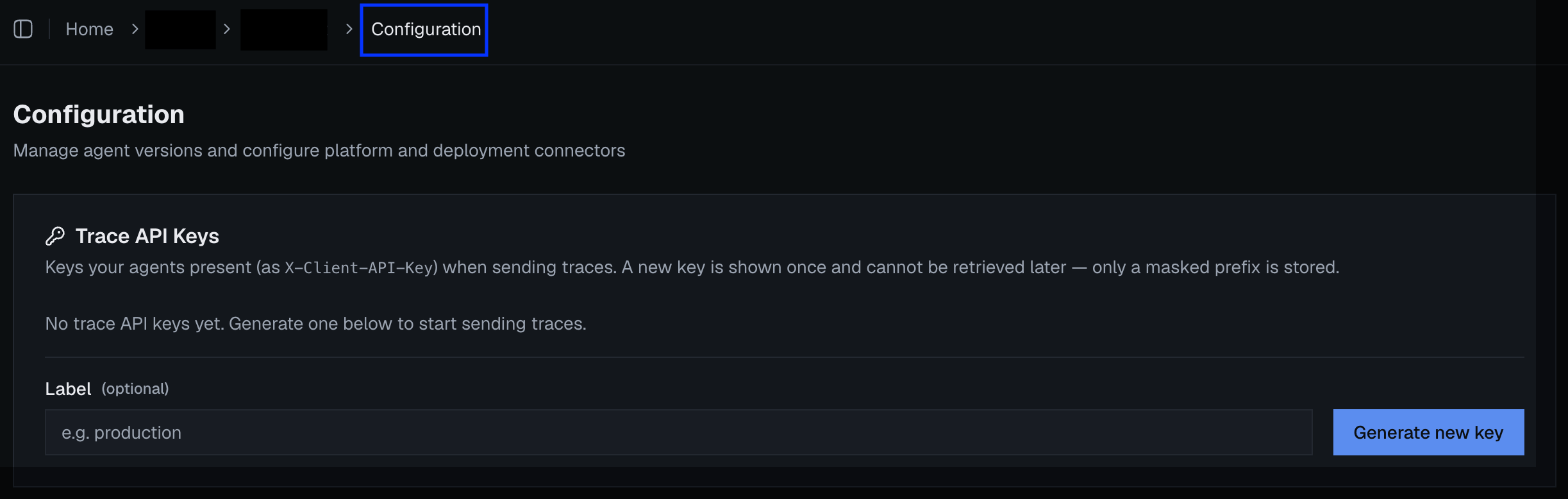
Your agent's Configuration page → Trace API Keys → Generate new key
init() uses the key to resolve your trace configuration from the Eldros platform at startup — you never configure endpoints, headers, or backends yourself, and rotating infrastructure on our side never requires a client change.
One key per agent
Generate a separate key for every agent you onboard — the key is the agent’s identity. That’s what keeps each agent’s traces and conversations isolated from one another, and it’s how Eldros knows which agent a simulation run or a judged conversation belongs to. Sharing one key across agents merges their telemetry into a single stream that can’t be cleanly separated afterwards.All settings
Explicitinit() kwargs always win over environment variables; environment variables win over defaults.
Boolean environment variables accept
1/true/yes/on (anything else is false).
What init() does at startup
- Resolves settings (kwargs → env vars → defaults).
- Makes one brief blocking call to the Eldros platform to fetch your trace configuration — call
init()at import time or in your startup hook, before your event loop starts, not inside it. - Wires up OpenTelemetry and auto-instruments the LLM libraries whose extras are installed.
Failure behavior — designed to never take you down
- No API key / resolution fails: the SDK logs a warning and degrades — spans are still created but not exported. Your agent runs exactly as before.
enabled=False(orELDROS_TRACE_ENABLED=false): everything becomes a hard no-op — the documented kill switch for incidents or environments where telemetry must be off.- Not initialized at all: every SDK call (
turn(), instrumentation) is a safe no-op. It is safe to leave Eldros code in paths that sometimes run withoutinit().